 While I have a couple of STM32 development boards already, I was looking around for something a bit more flexible. Somehow, development kits always seem to have the wrong set of peripherals and pins I want to play with are not available. After a bit of hunting, I came across this board, made by ETT. It comes in a convenient, small size with two single rows of pins for the IO. Perfect for plugging into a breadboards for some proper playing…
The board can be purchased from FuturLec for less than $25 at the time of writing. I had mine from an Ebay supplier just for the convenience of Paypal and Ebay. It took about a week to arrive from Thailand. Find out more about it here:
http://www.futurlec.com/ET-STM32_Stamp.shtml
There is no JTAG connector on the board. Instead, a pin header is connected to he UART via a RS232 level converter for boot mode programming. This suits me perfectly. I have all the tools I need and programming using the Python bootloader described in previous posts works just fine. My end application for this chip won’t have room for a standard JTAG header and I haven’t found anything to implement the serial wire debug yet. the processor supplied is the STM32F103RET6. This is a 64 pin device with all the standard stuff, some extra timers, 512k flash and 64k RAM. Should keep be happy for a bit.
If you are a Windows user, the CD included with the board has a bunch of stuff and is enough to get you started writing code for it. Also in the box was a serial lead to connect a standard 9 pin serial port (or USB serial adaptor) to the pin header. All really very convenient.
After a short period cutting and stripping wires, I was ready to start using my new toy. I really dislike the wiring-up part. It never looks neat when I have finished and it is always a relief to get that bit done.
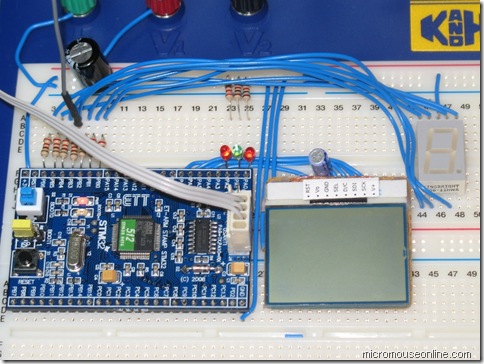
Just for now, it is connected to a few LEDs and one of my trusty Nokia LCD displays. First, things first: get a few lights blinking. Now, having access to all the pins makes it very easy to try out all the pin functions and see how things will work in the final application before getting too committed to the design. Pretty well straight away, I came across some issues to take note of.
Firstly, one of the pins needed to make the processor run in the right boot mode is BOOT1. This happens to also be tasked as PB2. Once the processor has booted up, it can be used like any other GPIO pin but, when using the serial bootloader, or to boot from internal flash, it must be held at zero. the trouble here was that I was using a common-cathode 7 segment display connected to the lower 7 pins of port B. Consequently, PB2 and, therefore, BOOT1 are held high at reset and the bootloader cannot work. For now, I will disconnect the display when programming but a better solution will be to make sure that does not happen in an actual application. In this case, a common-anode display would have been a better choice.
The next problem was that two of the display segments would not come on. That was because they are connected to PB3 and PB4. After a reset, their default function is as JTDO and JNTRST on the JTAG interface. To use these pins as normal GPIO pins, it is necessary to turn on their alternate function. This took a little bit of figuring out but one of the peripheral driver library examples show you how to do exactly that. The only other catch to look out for is to remember that all the IO registers need a clock turning on before they will work. That, apparently, includes the resister that holds that disables the JTAG. The driver library calls needed to completely disable JTAG and single-wire debug are:
  /* turn on the clock for the alternate function register */

  RCC_APB2PeriphClockCmd(RCC_APB2Periph_AFIO, ENABLE);

  /* Disable the JTAG interface and enable the SWJ interface */

  /* This gets us back pins PB3 and PB4 and the JTAG pins    */

  GPIO_PinRemapConfig(GPIO_Remap_SWJ_Disable, ENABLE);
I have plenty of flashy light now. Next, time to get the LCD working.
Hi,,, I am jnut from thailand
Now I have some problem with j-link… After I set GPIO_PinRemapConfig(GPIO_Remap_SWJ_Disable, ENABLE); and download to flash and run ,,, it ok,,,,
After I edit some code and compile and prog again,,, the j-link can’t connect to board….
But I use ulink it ok,,, I don’t know why?
http://www.jnutthailand.com/picture/TFT/error3.jpg
Error picture
I am sorry – I don’t know enough about the J-Link to be able to offer any real help.
Hello,
I have the same problem with Jnut,
My code use GPIO_PinRemapConfig(GPIO_Remap_SWJ_Disable, ENABLE);
I’m thinking it is problem when I want to re-download program via JTAG. It doesn’t work.
Now I’m trying to use Boot Loader to download new program
I set BOOT0 to high and BOOT1 to low and then use Flash Loader from ST to download.
But I cannot use it, Error message shows “No response from the target…”
Give me some advice,
Thanks and regards,
Nott (Thailand)
did you use RS232 programmer to connect between pa9 pa10 and USB? Could you show what exactly you did with more details? ICSP is supposed to be the ultimate solution for those who disabled jtag by accident on JTAG programmer.
You can also try setting the processor into bootloader mode and then use the JTAG/SWD connection. That will prevent your remap code from running.
Green, Thanks for your advice.
Actually I use this board : http://www.etteam.com/product/ARM/ET-STM32F103.html
(Page is Thai language, I cannot find page which is in English)
Anyway in my experiment, I use standard JTAG pins. I could not program chip after excute remap command GPIO_PinRemapConfig(GPIO_Remap_SWJ_Disable, ENABLE);
Could you tell me more how to use ICSP?
BR,
Nott
Peter Harrison,
I already try but it didn’t work 🙁
I cannot connect board at all…
BR,
Nott
I coud revive it by using the entire 20pin JTAG adapter. Power off/reset or adding the nTRST pin did not work.
Hi, I borrow this board. But the CD is broken. Could you have some files about this. Thank you
Not any more, sorry.
There is a link to the manual and schematics here:
http://www.micro4you.com/store/stm32f103-module.html
Hi,
Often it is better to use: GPIO_PinRemapConfig(GPIO_Remap_SWJ_JTAGDisable, ENABLE);
The function GPIO_PinRemapConfig(GPIO_Remap_SWJ_Disable, ENABLE); will disable the SWD interface. To unblock it, follow this steps:
0) download STM32 ST-LINK Utility (http://www.st.com/web/en/catalog/tools/PF258168)
1) connect the SWD interface (SWCLK, SWDIO and GND line)
2) press and hold the reset button (NRST shorted to GND) – the SW interface will not be disabled by your software
3) select in ST-LINK Utility ‘Target’->’Erase Chip’
4) release the reset button – the chip will be erased