A while back, I posted a way to make simple reflective wall sensor responses appear linear. After struggling with it for a while, it is apparent that it is over complicated. There is an easier way to get acceptable responses…
The previous method is here. While the results are very accurate, the method requires two readings for each sensor to calculate the constants and it is all a bit fiddly to get right. A conversation with Khiew Tzong Yong revealed that he takes only one reading to calibrate his sensors. Have a look again at a typical sensor response with ADC reading plotted against distance from the wall. Here three responses show the effect of walls of slightly different reflectivities.
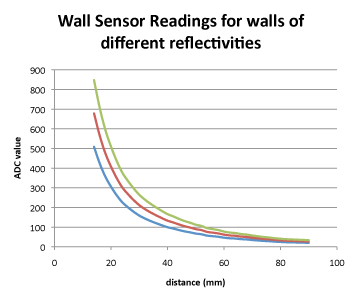
It is not immediately clear from the graphs what is going on although it is easily explained. The red curve represents a ‘standard’ wall. The blue response is from a slightly less reflective wall and the green one from a slightly more reflective wall. Each of these is simply the standard response multiplied by some constant representing wall reflectivity.
As before, these curves are a good fit to an exponential so that we can transform them to a pretty good straight line by taking the logarithm of the ADC reading an calculating 100/ln(ADC). On the mouse, it is convenient to create a table of natural logarithms suitably scaled because it is a relatively expensive operation to calculate them in real time on the mouse. Once transformed, the three responses look like this:
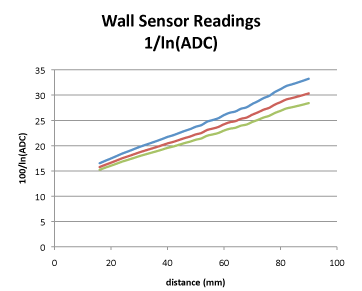
Now the responses look pretty useable for steering but there is still the problem of the wall reflectivity. when the mouse is in the correct position in the maze, the sensor should return a specific value. Suppose I want that to be 100. It doesn’t need to be an actual distance – the important thing is that the value always be in a given range and that, at any actual distance, the response be the same.
All that is needed is to record the actual sensor value at the proper position and use that to scale the responses. So, for this example, I choose the ‘proper’ distance to be 50mm and record the ADC reading at that point (ADC50). All the sensor readings are then converted using the equation Distance = 100*ln(ADC50)/ln(ADC). Clearly, when the sensor is at 50mm from the wall, it must now give a value of 100 once it has been calibrated for that wall. A single reference reading is enough to calibrate the sensor. Now the responses look like this:
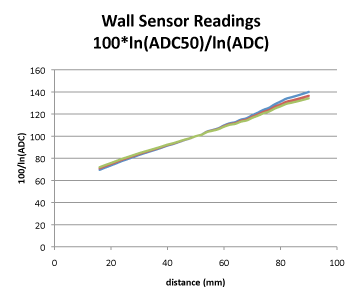
You will see that there is a small change in slope caused by the different reflectivity but otherwise the three responses are now very similar and certainly good enough to use in the mouse.
One caution though. Suppose you callibrate against an odd wall. It soon becomes apparent in contests that not all the walls are as reflective as each other and they may easily vary by 10%. If you are using infra-red sensors, you may not be able to see the difference between lighter and darker walls. The result will be that your mouse may run with an offset – preferring to be a few mm off centre. This will probably not be too much of a problem and you can see mice do this occasionally.
There is some danger in calibrating between two dark walls or between two light walls as that can mess up your steering algorithm depending on how you do it. Always check in a couple of places but the moral is – reflective walls sensors are not highly reliable and should not be relied upon for sub-millimetre accuracy.
Thanks to Khiew Tzong Yong for pointing this method out to me.
Thank you for sharing these useful informations, you noticed a very good idea about using stepper motor. But I think the data that is read from gyro has noise and I had heard that it needs to use a filter (like Kalman filter) to reduce the noise.
For this application, noise is not really a big problem. There will be drift if you try to integrate the gyro value to determine heading but, again, this turns out not to be a big problem in this application.
Things like unmanned vehicles and autonomous navigating robots will need greater care.
Hey Peter, I have a question regarding the values outside of these charakteristics, As I’ve noticed on my mouse, that they’re hardly linear over 100mm. Do you even use the values from outside the shown characteristics?
Do you mean the ‘linearized’ values are not very linear?
This can be because of the geometry of your sensors and the physical parameters of the devices. It is not actually clear to me that you need to transform them and it may be that you can use the reflected values as they are. What I think you will need to do though is normalise the readings so that you can calibrate against different walls.
Although I get good readings out to about 150mm, I pretty much ignore everything beyond 100mm for the side and diagonal sensors because the signal to noise ratio falls off badly. The front sensors are set up to work over linger ranges – up to 200 mm if possible.
yeah, I used to try to linearize the sensor for all range and failed hard, so now I don’t linearize it at all by just using the raw data, and it turned out working well. However, I still want to linearized it. The linearization is only valid within some certain range.
yeah, my sensors after linearisation, don’t give pretty linear results. I think they still need calibration. When you’ve got the sensor and emitter next to each other (instead of one above the other), how do you point the emitter? Do you bend it a little towards the sensor, so the beam will go in an angle, or exactly parallel to the sensor?
I do it as described here:
https://micromouseonline.com/2013/02/03/micromouse-sensors-alignment
One last thing. I noticed that after the second calibration method, you still have a very good slope on the y axis (100*LN(ADC50)/LN(ADC)) while mine on the whole distance from 0 to 100 mm goes from 98 to 101…
Here are my sensors characteristics:
http://imgur.com/j6exBG0
the one on the left is your second calibration method, and the one on the right is inversing the characteristics to retrieve the distance
Your slope is too shallow. I could not say why. However, don’t try to reverse the calculation to find the true distance, just use the linearized value as it is. You can increase the slope by just changing the multiplier to a larger number.
You can also try 6th order polynomial, or power. Sensor behaviors are different with different sensors.
I asked this method to Khiew Tzong Yong during APEC and he said he used to make all 6 sensors with different equation and turned out being too complected so he unify all sensors with one equation, by sacrificing the accuracy to trade off with simplicity.
To be honest, make a comfortable linearized curve takes a lot of efforts, if you are more eager to make your mouse work, you can skip this part, can just let the mouse run with the raw data from sensors, Ng Beng Kiat didn’t linearized the sensors on his Min7 BTW.
BTW, I think the your side sensors on you Kirin mouse is kinda too flat, may be a little bit more angles will give better performance to make the mouse go straight, I am looking forward to see you have any updates on your blog.