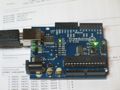
 As a first step, the blinking of an LED is an essential part of development for a new processor and environment. I had read somewhere that the bootloader on an arduino was compatible with an avrisp/STK500 programmer. That turns out to be quite right!
Following the instructions in the getting started guide for the AVR Macpack, I created a new project and entered the following for main.c:
#include#include int main(void) { DDRB = 0xff; /* make the LED pin an output */ for(;;){ char i; for(i = 0; i < 10; i++){ _delay_ms(10); /* max is 262.14 ms / F_CPU in MHz */ } PORTB ^= 0xff; /* toggle the LED */ } return 0; /* never reached */ }
the Makefile needed a little bit of editing. This just involved the lines near the top describing the device and the programmer:
DEVICE     = atmega168
CLOCK      = 16000000
PROGRAMMER = -c avrisp -F -b 19200 -P /dev/tty.usbserial-A9006L3s
The port is where my iMac found the Arduino USB-serial converter. The baud rate needs to be set to 19,200 for the bootloader and I had to set the -F flag to stop avrdude complaining about the device signature. Presumably, the Arduino bootloader code reports itself differently. If I can find out what that is, it would be worth adding some appropriate lines to the avrdude.conf file.After all that a traditional
make
make flash
and, after a dab at the reset button, we have a blinky light on the board - always a pleasing achievement. Now to haul out some old AVR kit and do some more experiments...