 AVRMacPack works well enough in Xcode but I don’t understand Xcode so I wen looking for an alternative. While trawling through back issues of SERVO magazine, I came across a pair of articles by Dennis Clarke about setting up Eclipse with AVRMacPack and the avr-eclipse plugin. One of my recurring mistakes is the feeling that you can’t have enough development tools so I gave it a go…
The AVRMacPack installation, I already had on the machine. It neatly puts everything your need – the compiler, avrdude and so on – into the folder /usr/local for you. Next I had to get, and install a copy of Eclipse. That is mostly straightforward. A suitable tarball can be had from
http://www.eclipse.org/downloads
At the time of writing, the current release is ‘Ganymede’ – version 3.4.2. In the Servo articles, Dennis Clark refers to the ‘Europa’ release which seems to install slightly differently. The tarball contains a single folder called eclipse. I dragged this straight into the Applications folder on my iMac. In there is an application icon for eclipse. It can be dragged to the dock if you want rapid access to it. Otherwise, double clicking will launched Eclipse. By default, it will ask you where to put the workspace. Several workspaces can be created and you can switch between them at will. I renamed this one to distinguish it form another, workspace folder on my machine. At this stage, you could have a little play with the options. I was a bit disappointed in the welcome splash screen since the text by the links didn’t render properly. To see fundamental errors that early in your experience with a product is never encouraging. Now I needed the avr-eclipse plugin. That can be had from:
http://avr-eclipse.sourceforge.net/
The link takes you straight to a wiki and, if you follow the link for downloading, you will find instructions on how to grab the plugin directly from eclipse. It goes like this:
- In eclipse, click Help | Software Updates
- Choose Available Software then Add Site…
- Enter this URL: http://avr-eclipse.sourceforge.net/updatesite/
- After a pause while the site is checked, you should see the AVR Eclipse Plugin listed.
- Tick the appropriate boxes and click the Install… button
- After a while the plugin will have downloaded and you can hit Next and agree to the license.
- Eclipse needs to restart and you should be ready to go./li>
It should be imediately apparent that Eclipse now knows about the AVR because there is a new menu item called (reasonably enough) AVR. This is used to program the target device. For now, you can choose File | new… to create a new C project:
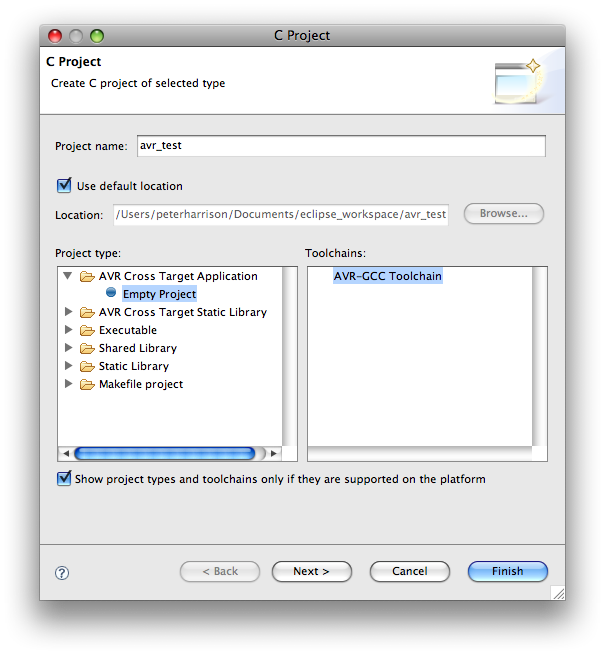
The project is set up without any files so it is now a simple matter of adding or writing the relevant source code files and the project can be built in the normal Eclipse manner. AVRMacPack gives a choice of versions for the GCC compiler to be used. I left mine set as it arrived which uses avr-gcc version 4.3.2. After a bit more fiddling, I tried the programmer. Avrdude is the programmer of choice and I had already got this working on an Arduino board when trying the Xcode tools. In there I had to edit the makefile to get the options right. Here I change the project properties and it is all a lot more comprehensive. The Arduino can be programmed with a direct USB connection thanks to its on-board usb-serial converter and the bootloader that emulates an avrisp (STK500). The programmer needs the -F flag (set in the advanced settings tab) to override the checking of the device signature. The serial speed is set to 19,200 baud and everything works almost like magic. After the project is built, a click of the programming button and it just sorts itself out. Marvellous. If I had realised that avrdude was so handy before, I would have used it ages ago.
Hi, you got linked from the Make: magazine blog.
I’ll note that some newer Arduinos have avrdude run at 57600 baud — The Duemilanove w/ ATmega328 being one such device.
I’ve installed Eclipse Helios (eclipse-cpp-helios-SR1-macosx-cocoa) and the AVR plugin as instructed above, but when I select “New -> C Project” there are no options for an AVR Project. The “AVR Cross TargetApplication:Empty Project” Project Type is missing.
Clearly this worked for some combination of versions of Eclipse, AVR plugin and MacOS.
Can anyone confirm a version of Eclipse and AVR Plugin that work with MacOS 10.5.8? (And ideally, indicate where to get those versions?) I’m dying to get coding in C for AVR. Unfortunately, so far, the wheels are spinning, but there’s no traction.
Thanks!
Have now tried AVR Plugin versions 2.3.3 and 2.3.4 with Eclipse Helios and Ganymede. None of the combinations cause an AVR option to appear when selecting “New C Project”.
Anyone have any insight?
The MacOS is 10.5.8
You will need to install the GCC AVR tools first. These are now called AVRCrossPack and can be obtained here:
http://www.obdev.at/products/crosspack/download.html
Not sure if you need to repeat the eclipse plugin install but it eamines the PATH setting to find the compiler. I think.
Although I dont do AVR stuff any more, I just ran through all the steps and re-installed everything with the latest versions and it seems to work just fine.
Okay, I reinstalled AVRCrossPack (CrossPack-AVR-20100115.dmg). It works. I went ahead and created a “sample” project.
Verified that the /etc/profile file contained:
if [ -e "/usr/local/CrossPack-AVR" ]; then PATH="$PATH:/usr/local/CrossPack-AVR/bin" export PATH fiStill doesn’t work.
Versions:
	CrossPack 20100115
	Eclipse Helios C/C++
	AVR Plugin (current version from Sourceforge)
	MacOS 10.5.8
Also checked to make sure ~/.profile contained correct PATH information.
Eclipse shows the plugin is installed, but when selecting a new C Project, it does NOT display an AVR option.
Quit Eclipse, cleared console, launched Eclipse. The system log reports:
	 Sunday, January 9, 2011 12:34:40  US/Eastern
	Jan  9 00:35:03 KBook /Applications/eclipse helios/Eclipse.app/Contents/MacOS/eclipse[35294]: Unrecognized Java VM option ignored: -XstartOnFirstThread
	Jan  9 00:35:03 KBook /Applications/eclipse helios/Eclipse.app/Contents/MacOS/eclipse[35294]: Unrecognized Java VM option ignored: -Xdock:icon=../Resources/Eclipse.icns
	Jan  9 00:35:03 KBook /Applications/eclipse helios/Eclipse.app/Contents/MacOS/eclipse[35294]: Unrecognized Java VM option ignored: -XstartOnFirstThread
…which doesn’t mean anything to ME, but maybe it is a useful clue?
Can you tell me what versions of each package you used? Maybe there’s a conflict somewhere?
Sorry if I’ve trashed this blog. My comments were not showing up, but I just noticed they ARE appearing in the “recent comments” box. Are they awaiting moderation? Or is there a blog problem?
Don’t worry. Sorry if it made you frustrated but all comments are moderated. This is not the worlds most popular blog but it still gets as many as 80 spam comment attempts a day.
I have tidied up a bit now.
The versions I used appear to be exactly the same as those you listed – except that I am using OS X 10.6.5 and I grabbed the 64 bit versions.
All is not sweetness and light. There appear to be some include paths not automatically set for example. I does, however, give me the option to create AVR projects and compiles stuff just fine.
If it is not about 32 bit vs 64 bit, I can only think that there are some settings in a possibly hidden file somewhere that have not been created in your install but which may have been left over from a previous installation on mine. Goodness knows where they might be or even if that is the reason. I will look at it a bit more.
Does your PATH variable include /usr/local/CrossPack-AVR/bin?
From a terminal, what does it tell you if you ask ‘which avr-gcc’
kurt|~:echo $PATH
/opt/local/bin:/opt/local/sbin:/sw/bin:/sw/sbin:/usr/local:/usr/local/bin:/usr/local/sbin:/usr/local/mysql/bin:/usr/local/mtasc:/usr/local/tomcat/bin:/bin:/Users/kurt/bin:/usr/bin:/usr/sbin:/sbin:/bin;/usr/local/avr/bin/:/usr/local/CrossPack-AVR/bin/:/usr/brlcad/rel-7.12.2/bin:/usr/X11R6/bin
kurt|~:
kurt|~:which avr-gcc
/usr/local/bin/avr-gcc
AIE-E-E-E-EEE!
A little probing showed a prior version of avr-crosspack dumped in the /usr/local/bin file, hence the “which avr-gcc” error above.
Could this be the answer?
Deleted the files in /usr/local/bin.
Now:
kurt|/:which avr-gcc
/usr/local/CrossPack-AVR/bin//avr-gcc
kurt|/:
...

kurt|/usr/local:l | grep -i avr
lrwxr-xr-x    1 wheel     22 Jan  9 00:12 CrossPack-AVR -> CrossPack-AVR-20100115
drwxr-xr-x   19 wheel    646 Jan  9 00:12 CrossPack-AVR-20100115
kurt|/usr/local:
Looking good.
Start Eclipse
Delete plugin
Restart Eclipse
Install Plugin
File->New->C Project and….
… still no AVR option.
One would think that if the plugin is installed, the menu items would appear – even if the path wasn’t right. (Clicking them might not get you anything useful, but it should still show up – shouldn’t it?)
Anyway, we’ve eliminated another possible cause.
What next?
I am afraid I don’t know enough to be of any more help. I had hoped that there was a previous version causing trouble but, with that gone, I wouldn’t know what else to do.
Did you delete the
/usr/local/avr/bin/entry in your path? If Eclipse is searching the path, it may cough on that.If nobody pops up here with an answer, and you do get it sorted, would you post the answer here in case others have the same problem?
Went through and wiped out everything AVR, MacPack, CrossPack, Eclipse I could find.
Installed current version of CrossPack-AVR-20100115.dmg
Downloaded and installed Eclipse IDE for C/C++ Developers, 87 MB 32-bit install
Started Eclipse
Installed AVR Plugin
Same result. No AVR options
The system log contained:
Jan 12 00:34:27 KBook diskarbitrationd[53]: DiskManagementTool [43967]:40983 not responding.
Jan 12 00:34:34 KBook kernel[0]: Finder[6892] Unable to clear quarantine `CrossPack-AVR.pkg': 30
Jan 12 00:36:26 KBook /Applications/BBEdit.app/Contents/MacOS/BBEdit[584]: StatusMonitor::volumesChangedCallBack returned -47
Jan 12 00:36:28 KBook kernel[0]: Finder[6892] Unable to clear quarantine `CrossPack-AVR.pkg': 30
Jan 12 00:41:17 KBook /Applications/eclipse/Eclipse.app/Contents/MacOS/eclipse[44791]: Unrecognized Java VM option ignored: -XstartOnFirstThread
Jan 12 00:41:17 KBook /Applications/eclipse/Eclipse.app/Contents/MacOS/eclipse[44791]: Unrecognized Java VM option ignored: -Xdock:icon=../Resources/Eclipse.icns
Jan 12 00:41:17 KBook /Applications/eclipse/Eclipse.app/Contents/MacOS/eclipse[44791]: Unrecognized Java VM option ignored: -XstartOnFirstThread
Jan 12 00:44:00 KBook [0x0-0xa31a31].org.eclipse.eclipse[44791]: Job found still running after platform shutdown. Jobs should be canceled by the plugin that scheduled them during shutdown: org.eclipse.epp.usagedata.internal.gathering.services.UsageDataService$1
Jan 12 00:44:00 KBook com.apple.launchd[205] ([0x0-0xa31a31].org.eclipse.eclipse[44791]): Stray process with PGID equal to this dead job: PID 44807 PPID 1 eclipse
Jan 12 00:44:00 KBook /Applications/eclipse/Eclipse.app/Contents/MacOS/eclipse[44807]: Unrecognized Java VM option ignored: -XstartOnFirstThread
Jan 12 00:44:00 KBook /Applications/eclipse/Eclipse.app/Contents/MacOS/eclipse[44807]: Unrecognized Java VM option ignored: -Xdock:icon=../Resources/Eclipse.icns
Jan 12 00:44:00 KBook /Applications/eclipse/Eclipse.app/Contents/MacOS/eclipse[44807]: Unrecognized Java VM option ignored: -XstartOnFirstThread
A couple things in there look a little shady, but I don’t know enough about the components to know whether “quarantine” or the Java messages are important. Maybe someone with a successful installation can check their log and see if they see the same things.
This is about the fifth time I’ve reinstalled the software. Doesn’t look like it’s ever going to work.
I too had the same problem. I would install the plugin and there would be no sign that the plugin was installed other than it being listed in the Eclipse Installation Details panel. I am using Mac OS X 10.5.8 (don’t ask ;-)) and Eclipse Galileo (also don’t ask). I tried uninstalling and reinstalling the AVR Plugin (among other things). I realized that the update site was listing only the newest version of the plugin, even when asking to display all versions. I manually installed (via the .zip) the version of the plugin which was newest before the release of Galileo which was 2.3.1. Sure enough, everything suddenly showed up. I hope this helps others. I may try other versions of the plugin before 2.3.4 (which was what was available via update site).
Hi,
Thanks for a great tutorial. It seems like I’ve done everything correct, but..
Wen I’ve started a new proj. and start typing my code:
#include
#include

int main(void)
{
	while(1){
		PORTB = 0xff;
		_delay_ms(500);
		PORTB = 0x00;
		_delay_ms(500);
	}
}
Then Eclipse don’t know what PORTB is, neither if I use DDRB.
Does anyone have a suggestion for me what I could have done wrong?
THANKS!
that is probably because the other posting I did about blinking a light seems to have got mangled in the morve to wordpress.
The lines that start #include should probably be
#include "avr/io.h"
#include  "util/delay.h"
Also, try looking here:
http://www.ladyada.net/learn/proj1/blinky.html
But I can not be sure right now.