Tag Archives: profiler

Decimus performance graphs

Time to do some tuning of the motion control parameters in Decimus. First I wanted to get some idea of how it is behaving with the initial settings. I have added a simple flight recorder function. A 4 kB buffer can hold up to 2000 integers. These are placed in the buffer on every timer tick. Thus I can record one second of two integers. this isn’t much but it is all I have available on the processor. Any future mouse will have to have a bigger data buffer.
For now, I am recording the profiler’s set speed and the average of the two wheel encoders. Set Speed is stored as a fixed-point 8.8 number so I get nice smooth results from this. However, since the encoders can only record whole counts, the numbers are discrete and even after averaging are correct only to the nearest half a count.

The first test was to place the mouse on its little stand with the wheels in the air. The profiler was told to run forward 2 cells (260mm) using a forward acceleration of 3m/s/s and a maximum speed of 0.5m/s/s. kP is set to 1 and kD is set to 2. These are the results:

performance20080323a_onbench

You can see that the wheels track the set speed quite well. There is a bit of a lag which is to be expected as there will need to be an error for the controller to demand movement from the wheels. The other thing is the deceleration profile. Ideally, this would be a straight line but once again, the mouse lags and that error generates the drive to the motors. However, as the mouse gets to the end of its run, the controller has to generate increased accelerations to try and get the mouse to stop in the right place. This should be fixable somehow but I am unsure exactly how. Some feedforward would help in many ways and might assist here. Possibly the profiler needs to round off the deceleration value a bit better. I am not sure that is so good as I have noticed that the profiler can apply sufficient braking to bring the wheels to a halt before the mouse has reached its final position. This is not good as it gets stuck there. I may have to add another terminating condition to do with the finishing speed.

Next, the mouse is placed on the maze floor and the same run is repeated:

performance20080323b_onmaze

Now the inertia of the mouse is apparent. In the first test, the mouse only has to accelerate the wheels which are small and light. the mouse is much bigger and has correspondingly greater inertia. You can see a much bigger lag during the initial phase of acceleration. the controller soon catches up however and after about 100ms (1mm on the ground) acceleration is back on target. When the target speed is reached, there is some overshoot that lasts about 300ms. Once again, the deceleration phase shows the greatest amount of lag and error as the profiler tries to bring the mouse to a halt in the exact spot.

Integrating these results shows the profile as a series of set positions and the actual mouse position by comparison:

performance20080323b_distance

Because of the scaling on the graph, these look like quite a good match. However when you look at the differences, it is clear that the final position as determined by the velocities and the actual counts from the encoders differ by about 150 counts. This is about 5mm on the ground and would represent a serious error over this distance.

the distance measured by the encoders is as close as we can get to the actual distance travelled by the mouse. Slippage will always generate some errors. The actual count recorded at the end of the move was 8600 counts. the distance calculated from initial calibration shows this should have been 8552. Thus the actual error appears to be about 48 counts or about 2mm. So long as this is not a cumulative figure, a 2mm error is quite acceptable at present. For all I know it may never get any better than that for anyone.

Continue reading

Posted in Micromouse | Tagged , , | 1 Comment

Decimus doing circuits

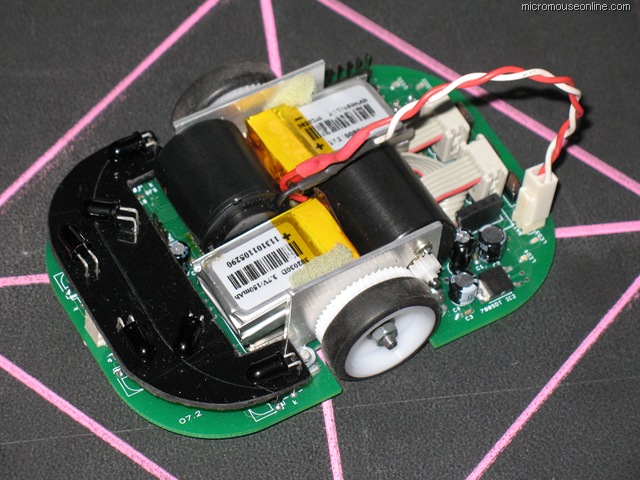
Decimus After a bit of a break, I have done some more work on Decimus, my DC micromouse. With all the peripherals tested and working, I have been concentrating on the motion controller or profiler. This has turned out to be harder than I expected. The basic idea is simple enough but the implementation turns out to be a bit tricky. Probably in part because I wanted it to be useable with Primus, the beginner’s stepper-driven micromouse.

Until I add the code into  Primus, I am not going to know how successful I have been but I have a fair degree of confidence. the profiler only communicates with the hardware in two ways. One is to read the encoders to find out how far the mouse has moved since the last timer tick. Primus has no encoders but instead keeps a pair of counters exactly equivalent to the values maintained by the encoder hardware in Decimus.

The other communication is with the motor driver. It is the task of the profiler to generate speed profiles appropriate to a particular movement. Each movement generate two kinds of speed information – forward speed and rotational speed. These speeds are given to the motor controller where they get resolved into appropriate speeds for each wheel. The motor driver in Primus can only set the pulse rate for the steppers so the speeds are used directly. Since the steppers are open-loop it is sufficient to assume that pulses get turned into wheel movement unless we push the controller too far.

For Decimus, the wheel speeds are used to update the setpoint for each wheel. An error term is calculated which is the previous error plus a new component due to the speed term less the distance the wheel has actually moved. This error, for each wheel is used in two PD controllers to determine the power to each motor.

For initial testing, arbitrary values have been used for the P and D constants. These allow the mouse to work but some work now remains to determine the optimum values for these constants.

Although Decimus can steer off the walls and implements forward error correction by looking at wall trailing edges, the sensors have not yet been calibrated or properly aligned so the whole process is still a bit flaky. Still, results so far are quite promising:

Continue reading

Posted in Micromouse | Tagged , | Leave a comment

Primus in control and moving

After a lot of messing about with other stuff, Primus is now back on track and has the basic motion code written and installed. Movement within the maze is possible with steering off the walls to prevent collisions; fixed size moves and in-place turns are functioning; forward error detection and correction is working.

There is quite a lot that is new in this version of the primus code. In fact, I am not going to try and decribe all of it in much detail so download the package and have a good look at the code.

You can grab the package from here: primus5.zip

As before, all the source code is in the package and some automatic documentation has been done by Doxygen. The MPLAB project should open up readily enough and compile without problems. Primus uses stepper motors to push it along. These have particular benefits and drawbacks. In their favour, they are simple enough to drive and capable of precise movements while being driven open-loop. There is no need for any feedback from the wheels. As long as we don’t get any slip, the motor will do just what we tell it. Within reason.

The driver electronics are based on the SLA7062 microstepping driver, configured to produce x16 microsteps. Normally, for the kind of motors on Primus, a complete revolution of the output shaft takes 200 full steps. It is common to drive steppers in half-steps so that it takes 400 half-steps to turn the shaft once. The result is greater precision, smoother motion and better response at speed.

The SLA7062 can make the motor move in steps that are 1/16 of a normal step or 3200 steps per revolution. With wheels of about 50mm diameter, this corresponds to about 0.05mm movement per step or about 517 steps per inch for those of you still measuring in rods and chains. There is a price to pay for this apparent precision. Suppose we want to move at 3m/s. With a conventional stepper driver using 200 steps per revolution, we would need to provide pulses at a rate of 3750Hz for each wheel. Many examples of stepper driver code do this by generating an interrupt for each step. In the interrupt service routine, the code decides how fast to produce the next step and may also sort out things like error correction and steering. At these speeds, we would have no more than about 125us per interrupt to do everything. On top of that we might have to do velocity profiling and handle all the sensors as well as work out where we are.

Clearly, the ISR code would need to be simple and compact. Even then there are issues about the interrupts overlapping. Drive the motors in half-steps and you have twice the frequency and half the time to work with. All in all, things soon get sticky. With x16 microsteps we would need pulses sent to the motors at about 60kHz each and an absolute maximum of 8us per interrupt. Some other method will be needed. The trick is to use the processor hardware to generate continuous pulse trains without using processor time, except to change the frequency periodically.

Although the dsPIC is reasonably well equipped it takes a little experimentation to find the best way to generate a pair of independant pulse trains and arrange for the number of pulses to be counted, all in hardware. I am pretty sure I have not got the best way but it works well enough for this version. Feel free to improve things as you see fit.

Two sixteen bit counters are driven from external pins to get the pulse count from the motor drivers. One pulse train comes from the standard output compare module OC1 while the other pulse train comes from the motor PWM unit. These can generate any frequency of pulses between about 500Hz and 16MHz. Some further work would mean a slightly more useful frequency range but that will do for now. Once we get the pulses sent to the motor, the SLA7062 will sort out everything else. An advantage of the interrupt driven approach is that we know, in each ISR, exactly how many pulses have been sent and thus how far we have travelled.

With free-running pulse generators, we need the 16 bit up counters to keep track of that information. The main control loop runs every millisecond and works out, from the counters, how far the mouse has travelled since the last tick. This is only accurate to the nearst pulse but if we just miss one this tick, it will be included next tick so none should get lost. We are only able to control the speed of the steppers, not the amount of torque they produce so movement assumes the motors are doing what they are told. The motion profiler is given some information like how far to travel, what acceleration to use and what should be the top speed. When movement starts, the value of acceleration is added to the current speed. The profiler checks that the maximum speed is not exceeded. On each tick, a check is made to see if the amount of deceleration needed to come to a halt at the destination is greater than the currently available deceleration. As soon as it is, the profiler switches from accelerating to decelerating and brings the mouse smoothly to a halt at the finishing point.

There will be a small amount of lost motion due to friction. This error is proportional to acceleration but on the Primus prototype is only a matter of a couple of millimeters at normal accelerations over a distance of 15 cells. The profiler code may appear complex. It may even appear overly complex. However, it is written with two aims in mind. First, that it should be extensible to allow smooth, integrated turns and secondly that it be extensible to the control of a DC motor driven mouse. There are other concessions to this extensibility in the code. They are there to give you a head start in adding to the capability of a future develpment of Primus. It has never been the aim to provide code to do all the things that are necessary in a competition mouse so simple rectilinear motion and in-place turns are as much as will appear in the published code. There will be a version of primus with integrated turns and diagonal running just to show that it can be done but don’t hold your breath for the source code for that.

Steering, in the sense of running straight down the walls, is a simple matter of collision avoidance. As soon as the mouse detects that a wall is getting too close, it adds a steering offset to the motor speeds thus steering it away. The diagonal sensors are used exclusively for this adjustment. The same idea could be applied to the forward looking sensors to help avoid collisions with the posts on both orthogonal (up, down and across) movements as well as when running diagonals. The side sensors are used to detect the presence of walls and to detect their edges. In particular, when a wall disappears, the mouse knows where it should be in relation to the centre of the cell. it can compare that position with the position calculated from the wheel counters and adjust that value if there has been any error. Such errors soon occur and can accumulate without suitable correction. They are not always due to wheel slippage. For example, if you are too far to the right before you execute a 90 degree right turn, you will start off the next straight already too far forward.

Note that the file ‘primus.h’ holds a lot of configuration information for the mouse. All of the constants to do with things like the number of counts per cell and the error correction offset etc will need to be determined for your mouse as they are different for every mouse. Calibration is a separate topic of its own and will (may) form the basis of a separate article. Driving the mouse from high level code is done through a command processor. A list of command can be created with instructions like

  • forward 3 cells
  • right 90 degrees
  • forward 6 cells
  • left 90 degrees
  • stop

The commands are executed in turn to move the mouse. This is particularly convenient when testing and the previouly published video of Primus running around a small test maze showed Primus simply following orders. In the full mouse software, this is also how the speed runs are done. Once the maze is solved a set of command can be generated that will take the mouse from the start to the finish and back again. The next installment should include code for simple exploration and solving of the maze.

It may even be enough to run in competition. Not long now…

if you have any questions or observations about Primus, its hardware or software or any of these articles, please go to the forum and ask them there so that others may benefit from both the question and the answer. You can find the forum here: www.micromouseonline.com/forum Happy Mousing

Continue reading

Posted in Primus | Tagged , | 4 Comments